See more SORA Case Study in My Medium Account
Overview
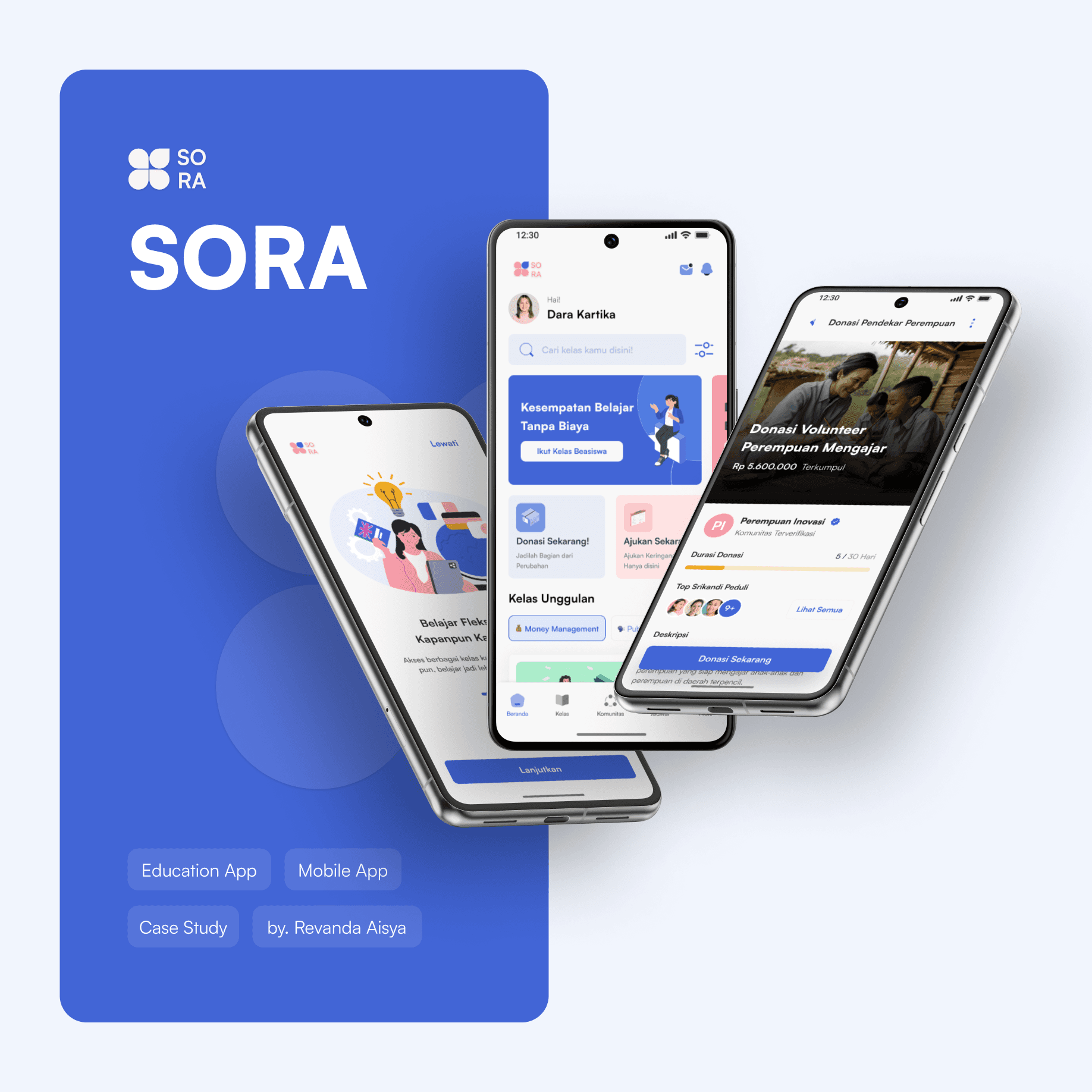
Sora (Sekolah Dara) is an education and empowerment application aimed at providing affordable and flexible access to skills training and learning materials for women in Indonesia. This application is specifically designed to support women facing educational access limitations and those looking to develop skills for future careers.
Background
The educational gap for women in Indonesia remains a significant challenge, particularly in areas with limited access. Sora emerges as a solution to enhance women’s educational participation through a flexible and affordable digital platform. Observations indicate that many women face barriers due to time and cost constraints in continuing their education.
Objective
To provide flexible, inclusive, and affordable educational access to empower Indonesian women so that they can enhance their skills, achieve independence, and seize better opportunities in the workforce.
⚠️ Disclaimer : This case study is the result of UI/UX design learning during the Perempuan Inovasi bootcamp. The information presented is based on research and observations made during the program, focusing on innovative solutions in education and women’s empowerment. Recommendations and analyses reflect the team’s design process and can serve as a reference in UI/UX skill development.
Team Profile
Our team, named RA Kartini, consists of dedicated UI/UX professionals committed to creating inclusive and functional user experiences. Hasna Salsabila, as Team Lead, is responsible for coordinating the project and making strategic design decisions to ensure every aspect of the user experience is relevant and optimal. I, Revanda Aisya, focus on user research, intuitive interface design, and prototype development with an emphasis on accessibility and user engagement. Aurhelya Dara Anardi supports the team through wireframe development, usability testing implementation, and designing visual solutions considering accessibility. Sophia Yolanda enhances brand identity with engaging visual elements and illustrations, ensuring every design supports a deep and memorable user experience.
Tools: Figma, Zoom, Google Workspace.
User Observation & UX Analysis
User Observation
Observations indicate that many women face significant barriers to accessing higher education. The main obstacles include economic constraints that limit their opportunities and a lack of access to suitable scholarships. Additionally, the lack of transparency in donation programs has led to reduced motivation among donors to support women’s education.
Initial UX Analysis
Women users require flexible and affordable educational solutions that can be accessed at any time to help enhance their skills and career opportunities. Furthermore, donation fundraising requires better transparency regarding fund allocation, which can enhance trust and donor engagement in sustainably supporting women’s education.
UX Research Plan
Background
Despite high female school enrollment rates, access to further education remains a challenge, especially for women with limited educational access. This platform aims to provide flexible education to empower Indonesian women through inclusive and more affordable educational access.
Objectives
Increase female user registration and engagement by achieving a 20% increase in registrations, an average of 30 minutes of daily usage, and a 15% retention rate among rural users within the first 6 months.
Understand the primary barriers women face in accessing education, especially in areas with limited access, and identify application features that support effective learning.
Evaluate the effectiveness of offline features in increasing course participation and completion rates, targeting a 25% increase in course completion within 6 months.
Research Questions
What are the main barriers to women’s education?
Why do many women not complete mandatory 12 years of education?
Can an online platform reduce educational disparities?
Hypotheses
Limited technology access and digital literacy hinder women’s education.
Economic factors and patriarchal culture affect women’s education.
Online platforms offer effective solutions to improve educational access.
Methods
Survey: Identify the needs and barriers to women’s education.
In-Depth Interview: Understand the causes and solutions to these barriers in detail.
User Target
Primary Demographic: Women aged 14–30 from various regions, particularly those with limited access to formal or non formal education.
User Segmentation:
Women Dropouts: Women who have stopped their education after primary school due to economic or cultural factors.
Women Facing Infrastructure Barriers: Limited educational facilities and access to the internet or electricity in their areas.
Women Using Technology for Education: Women who are already using digital devices for learning but still face technical or financial challenges.
Empathize & Define
Empathizing
Through desk research, interviews, and surveys, it was found that many women have an interest in learning new skills but are hindered by time and costs.
Competitive Analysis
While there are several e-learning platforms offering a variety of courses, many do not specifically focus on empowering women in Indonesia. Thus, there is an opportunity for a new application to meet the specific needs of women in accessing education and relevant skills in a more flexible and affordable manner.
Ideate & Prioritization
Ideation
In this stage, various techniques such as mind mapping, sketching, and discussion are used to encourage free thinking and stimulate creativity. The goal is to generate a diverse range of ideas that can be evaluated and further developed in the subsequent phases of the project. The brainstorming session produced several feature ideas, including flexible courses, skills training, and donation options.
Crazy 8's
Exploring visual ideas and quick sketches for key features.
Prioritization Matrix
Focusing on features that have a significant impact but are easy to develop in the early stages.SORA — Prioritization Matrix
Business Model Canvas
Developing a business model to ensure the sustainability of Sora, including revenue sources from donations or sponsors for specific classes.SORA — Business Model Canvas
Solution
Sora is an online academy platform providing formal and non-formal education for women facing educational access barriers. With a transparent donation program, Sora aims to alleviate financial and social obstacles preventing women from obtaining quality education.
Key Features :
Donation Program: Allows users to receive financial support for education through transparent donations.
kills Training Classes: Offers practical skills courses designed to support financial independence and empower women.
Unique Value Proposition (UVP)
Sora provides education and skills training at affordable prices complemented by a donation program, making it a flexible and inclusive platform. Focusing on women with limited educational access, Sora offers opportunities for independent learning without compromising educational quality, empowering women to achieve independence and better career opportunities.
User Flow
The main user flow within the Sora platform is designed to facilitate easy access and utilization of the Donation and Class Access features.
Donation Feature
Scenario: User wants to donate to help another woman continue her education.SORAClass Feature
Scenario: User accesses and completes a training class they have registered for to obtain a training certificate.
Wireframe, UI Style Guide. Hi-fi Design, Prototype
Usability Testing
Research Information & Timeline :
Testing was conducted over 2 weeks. During this period, we performed observations, interviews, and data collection from respondents to understand their experiences using the application.
Research Questions:
In this research phase, we posed several questions to understand user experiences with the application. These questions were designed to gather in-depth and useful data for further development of the application.
Initial Appearance: First impressions and visual appeal of the application’s initial view.
Donation Feature: User experience when using the donation feature, ease of finding information, clarity of buttons and icons, and suggestions for improvement. Users were also asked to rate this feature on a scale of 1–7 regarding ease of use and appeal.
Class Feature: Experiences in accessing class features, ease of finding classes that match their interests, and suggestions to enhance the learning experience. Users were also asked to rate this feature on a scale of 1–7 regarding ease of use and appeal.
Respondent Data
Women aged 18–30Status:
Working, Housewife, Jobseeker, Student, Recent Graduate
Education: Ranges from Elementary School to Bachelor’s Degree
Learning Interest: High or previously participated in online training classes
Economic Status: Lower middle class
Skills: Seeking to improve skills for better career opportunities
Single Ease Question (SEQ)
The overall SEQ results indicate that the application design falls into the “good” category with an average score of 6.72, which users deemed “OK!” This score suggests that while a range of 1–5.4 would indicate a need for design improvement, scores between 5.5–7 reflect a design that meets user needs effectivel
Conclusions and Insights
In summary, the Sora application demonstrates a well-structured flow, ease of understanding, and appealing visuals, though there are areas for improvement. Users expressed a desire for clearer notifications, especially during the registration process. Additionally, while the donation feature is engaging and informative, users found it somewhat difficult to locate information on donations. Enhancements to payment methods and donation amount entry could make these options more familiar and comprehensive for users. Overall, Sora shows great potential to deliver an optimal and satisfying user experience.
Iteration
Based on test results, adjustments included repositioning the banner and donation feature on the home page, adding more payment options, and introducing recent news on the donation detail page.
Conclusion
Sora successfully establishes itself as an inclusive platform that facilitates educational access for women, featuring donation options that foster solidarity among users to support equal education. Testing results indicate that Sora effectively addresses the educational and empowerment needs of women, while also creating a positive social impact.
Future Plans
Progress Dashboard
Display course progress charts and notifications for performance declines, as well as donation data that shows its impact.More Personalized Learning
Develop a customized curriculum using AI to recommend relevant courses for users based on their individual needs.Loyalty Program
Encourage recurring donations through rewards, allowing donation points to be redeemed for premium course access and badges for consistent contributions.